Recently there has been a FOSS Session name FOSS Forward jointly organised by Amtron(A govt of Assam Undertaking) & CDAC. The event was started with registration followed by Inaugural Session. The event attracted many Govt Officials & Students as the participants. The welcome address was given by Mr. M. K. Yadava, MD, Amtron. It was followed by the address of the Chief Guest, Commissioner & Secretary, IT, Govt of Assam. Other distinguised Guests were Mr. Jayanta Perial, Jt Director, CDAC, Kolkata and Mr S. Srinivasan Project Scientist, CDAC, Chennai. The event started with the meaning and importance of Free & Open Souce Software. Various queries related to Open source were addressed by the experts. The speakers discussed and gave demo on the newly developed Operating System BOSS(Bharat Operating System Solutions) by CDAC and NRCFOSS(National Resource Centre for Free & Open Source Software). Case studies were discussed regarding the use of BOSS in Govt. Sector. BOSS supports all the Indian official languages. Lots of packages comes in bundle with the distro which are very much useful in day to day official activities. Ministry of Defence have already adopted BOSS as their official platform. Recently Election Department, Tripura Govt have saved lots of money by implementing BOSS in generating electoral roll.
Adsense
Translate it to ur language
Monday, April 11, 2011
FOSS Forward Guwahati : Bharat Operating System Solution
Recently there has been a FOSS Session name FOSS Forward jointly organised by Amtron(A govt of Assam Undertaking) & CDAC. The event was started with registration followed by Inaugural Session. The event attracted many Govt Officials & Students as the participants. The welcome address was given by Mr. M. K. Yadava, MD, Amtron. It was followed by the address of the Chief Guest, Commissioner & Secretary, IT, Govt of Assam. Other distinguised Guests were Mr. Jayanta Perial, Jt Director, CDAC, Kolkata and Mr S. Srinivasan Project Scientist, CDAC, Chennai. The event started with the meaning and importance of Free & Open Souce Software. Various queries related to Open source were addressed by the experts. The speakers discussed and gave demo on the newly developed Operating System BOSS(Bharat Operating System Solutions) by CDAC and NRCFOSS(National Resource Centre for Free & Open Source Software). Case studies were discussed regarding the use of BOSS in Govt. Sector. BOSS supports all the Indian official languages. Lots of packages comes in bundle with the distro which are very much useful in day to day official activities. Ministry of Defence have already adopted BOSS as their official platform. Recently Election Department, Tripura Govt have saved lots of money by implementing BOSS in generating electoral roll.
Sunday, April 3, 2011
Glorious Win
Saturday, April 2, 2011
Cricket World Cup Final 2011 India Vs Sri Lanka
Tuesday, January 11, 2011
8 useful sites for web developers
Min.us: The easiest way to upload images

Any developer, designer or webmaster have to share images online with clients and co-workers. Min.us is an all new service that allow you to upload images extremely easily: Just drag and drop them into Min.us and the image will be saved on their servers. A short url will be automatically created so you can share it across the web.
» Visit Min.us
Wirify: Transform any web page into wireframes

Wireframes are extremely useful when designing a website. Wirify is a bookmarklet that allow you to instantly convert any web page into wireframes that you can study or use for your own work.
» Visit Wirify
CSS Resetr: View and compare CSS resets

CSS resets are a must have in any stylesheet in order to render differences between browsers. Since 2004, a lot of differents CSS resets has been published. So, which one is the best for your project? CSS Resetr let you compare the result of the most popular resets on a web page.
» Visit CSS Resetr
Head JS: Speed up your site with 2.30 kb of Javascript

Head JS is a simple and light (2.3 kb) script that will make your site faster by loading other scripts as images. Head JS can do a lot more to modernize your site: CSS3 support, dynamic CSS, etc.
» Visit http://headjs.com/
Copy Paste Character: Use special characters with ease

Special characters are often a pain to deal with, because they’re not on your keyboard, and because you don’t know the related ASCII code. Of course, you can grab an ASCII table and keep it on your desktop, or you can use a new service called Copy Paste Character: Simply click on the selected character to have it copied to your clipboard.
» Visit Copy Paste Character
DB Designr: Create database schemas online

Here is a very great tool to easily create database schemas online. No need to create an account, you can loggin using your Google account (Well, I guess any CWC reader have a Google account!)
» Visit DB Designr
Web 2 pdf convert: Convert any web page to PDF

Web2PDF Converter is a very useful tool that convert any webpage into a PDF file. It works great: I’ve converted 5 pages and all where the exact copy of the html version.
This very handy tool have more to offer: You can email an url and receive the PDF back. You can also add a bookmarklet to your browser for faster archiving.
» Visit web 2 pdf convert
Easily link your html page to your JS library

Are you tired of hunting the Internet in order to find the script tag for the latest version of the Javascript library of your choice? ScriptSrc.net has compiled all the latest versions of jQuery, Mootools, Prototype and more in a single page which lets you copy it in your browser clipboard with a single click.
» Visit ScriptSrc
Like CatsWhoCode? If yes, don't hesitate to check my other blog CatsWhoBlog: It's all about blogging!
8 useful sites for web developers
Sunday, December 12, 2010
Management by consciousness
------------------------------------------------------------------------------------
Tamojyoti Bose
Mob: +91 9954030309
Res: +91-361-2607849
Sunday, November 14, 2010
Thursday, November 11, 2010
Monday, November 8, 2010
hacktivism
hacking into a Web site or computer system in order to communicate a
politically or socially motivated message. Unlike a malicious hacker,
who may disrupt a system for financial gain or out of a desire to
cause harm, the hacktivist performs the same kinds of disruptive
actions (such as a DoS attack) in order to draw attention to a cause.
For the hacktivist, it is an Internet-enabled way to practice civil
disobedience and protest.
Friday, November 5, 2010
CSS3 / HTML5
Friday, October 22, 2010
What I am?
Monday, August 30, 2010
New Title Background
Superannuation and Retirement
Tuesday, August 10, 2010
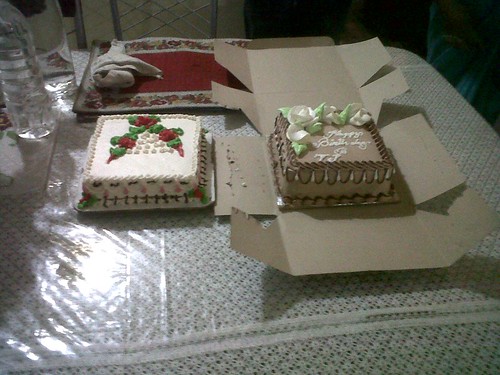
Cut cake after so many years

Cut cake after so many years, originally uploaded by Tamojyotihttp://www.flickr.com/people/tamojyoti/.
Had a gr8 time after so many years
Sunday, August 8, 2010
10 WordPress Dashboard Hacks
it allows you to control your posts, your blog design, and many more
things. When building a site for a client, it is especially important
to be able to control WP’s dashboard. In this article, let’s have a
look at 10 extremely useful hacks for WordPress’ dashboard.
Remove dashboard menus
When building a WordPress blog for a client, it can be a good idea to
remove access to some dashboard menus in order to avoid future
problems such as the client “accidentally” deleting the custom theme
they paid for.
****************************************************
Paste the following code in the functions.php file from your theme
directory. The following example will remove all menus named in the
$restricted array.
01.function remove_menus () {
02.global $menu;
03.$restricted = array(__('Dashboard'), __('Posts'), __('Media'),
__('Links'), __('Pages'), __('Appearance'), __('Tools'), __('Users'),
__('Settings'), __('Comments'), __('Plugins'));
04.end ($menu);
05.while (prev($menu)){
06.$value = explode(' ',$menu[key($menu)][0]);
07.if(in_array($value[0] != NULL?$value[0]:""
,$restricted)){unset($menu[key($menu)]);}
08.}
09.}
10.add_action('admin_menu', 'remove_menus');
» Source
Define your own login logo
Although it doesn’t have any importance for the blog performance or
usability, most clients will be very happy to see their own logo on
the dashboard login page, instead of the classic WordPress logo.
The Custom admin branding plugin can do that for you, as well as the
following hack that you just have to paste in your functions.php file.
1.function my_custom_login_logo() {
2.echo '
3.h1 a { background-image:url('.get_bloginfo('template_directory').'/images/custom-login-logo.gif)
!important; }
4.';
5.}
6.
7.add_action('login_head', 'my_custom_login_logo');
» Source
Replace dashboard logo with yours
Just as a client will love to see their own logo on WordPress login
page, there’s no doubt that they’ll enjoy viewing it on the dashboard
too.
Simply copy the code below and paste it to your functions.php file.
1.add_action('admin_head', 'my_custom_logo');
2.
3.function my_custom_logo() {
4.echo '
5.#header-logo { background-image:
url('.get_bloginfo('template_directory').'/images/custom-logo.gif)
!important; }';
6.}
» Source
Disable the “please upgrade now” message
WordPress constantly release new versions. Although for obvious
security concerns you should always upgrade; disabling the “Please
upgrade now” message on client sites can be a good idea because the
client doesn’t necessarily have to know about this, this is a
developer’s job.
One more time, nothing hard: paste the code in your functions.php,
save it, and it’s all good.
1.if ( !current_user_can( 'edit_users' ) ) {
2.add_action( 'init', create_function( '$a', "remove_action( 'init',
'wp_version_check' );" ), 2 );
3.add_filter( 'pre_option_update_core', create_function( '$a', "return
null;") );
4.}
» Source
Remove dashboard widgets
Introduced in WordPress 2.7, dashboard widgets can be pretty useful.
For example, some can display your Google Analytics stats. Though,
sometimes you don’t need it, or at least don’t need some of them.
The code below will allow you to remove WordPress’ dashboard widgets
once you paste it in yourfunctions.php file.
01.function example_remove_dashboard_widgets() {
02.// Globalize the metaboxes array, this holds all the widgets for wp-admin
03.global $wp_meta_boxes;
04.
05.// Remove the incomming links widget
06.unset($wp_meta_boxes['dashboard']['normal']['core']['dashboard_incoming_links']);
07.
08.// Remove right now
09.unset($wp_meta_boxes['dashboard']['normal']['core']['dashboard_right_now']);
10.unset($wp_meta_boxes['dashboard']['side']['core']['dashboard_primary']);
11.unset($wp_meta_boxes['dashboard']['side']['core']['dashboard_secondary']);
12.}
13.
14.// Hoook into the 'wp_dashboard_setup' action to register our function
15.add_action('wp_dashboard_setup', 'example_remove_dashboard_widgets' );
» Source
Add custom widgets to WordPress dashboard
With the previous example, I showed you how easy it is to remove
unwanted dashboard widgets. The good news is that creating your own
widgets isn’t hard either.
The well-commented code below should be self explanatory. Just insert
it in your functions.php, as usual.
01.function example_dashboard_widget_function() {
02.// Display whatever it is you want to show
03.echo "Hello World, I'm a great Dashboard Widget";
04.}
05.
06.// Create the function use in the action hook
07.function example_add_dashboard_widgets() {
08.wp_add_dashboard_widget('example_dashboard_widget', 'Example
Dashboard Widget', 'example_dashboard_widget_function');
09.}
10.// Hoook into the 'wp_dashboard_setup' action to register our other functions
11.add_action('wp_dashboard_setup', 'example_add_dashboard_widgets' );
» Source
Change WordPress dashboard colors
If you ever wanted to be able to change WordPress dashboard colors (as
well as font or even display) without having to edit WordPress core
files, you’ll like this hack for sure.
The following example features a basic style change (grey header is
replaced by a blue one) but you can easily add as many styles as you
wish within the and tags.
1.function custom_colors() {
2.echo '#wphead{background:#069}';
3.}
4.
5.add_action('admin_head', 'custom_colors');
Provide help messages
If you’re building a site for a client and they have some problems
with some parts of the dashboard, a good idea is to provide contextual
help to the client.
The following hack will allow you to add a custom help messages for
the blog admin. As usual, you only have to paste the code into your
functions.php file.
01.function my_admin_help($text, $screen) {
02.// Check we're only on my Settings page
03.if (strcmp($screen, MY_PAGEHOOK) == 0 ) {
04.
05.$text = 'Here is some very useful information to help you use this
plugin...';
06.return $text;
07.}
08.// Let the default WP Dashboard help stuff through on other Admin pages
09.return $text;
10.}
11.
12.add_action( 'contextual_help', 'my_admin_help' );
» Source
Monitor your server in WordPress dashboard
WordPress dashboard API allow you to do many useful things using
dashboard widgets. I recently came across this very useful code: a
dashboard widget that allows you to monitor your server directly on
WordPress’ dashboard.
Paste the code in your functions.php file, and you’re done.
01.function slt_PHPErrorsWidget() {
02.$logfile = '/home/path/logs/php-errors.log'; // Enter the server
path to your logs file here
03.$displayErrorsLimit = 100; // The maximum number of errors to
display in the widget
04.$errorLengthLimit = 300; // The maximum number of characters to
display for each error
05.$fileCleared = false;
06.$userCanClearLog = current_user_can( 'manage_options' );
07.// Clear file?
08.if ( $userCanClearLog && isset( $_GET["slt-php-errors"] ) &&
$_GET["slt-php-errors"]=="clear" ) {
09.$handle = fopen( $logfile, "w" );
10.fclose( $handle );
11.$fileCleared = true;
12.}
13.// Read file
14.if ( file_exists( $logfile ) ) {
15.$errors = file( $logfile );
16.$errors = array_reverse( $errors );
17.if ( $fileCleared ) echo '
File cleared.
';18.if ( $errors ) {
19.echo '
'.count( $errors ).' error';
20.if ( $errors != 1 ) echo 's';
21.echo '.';
22.if ( $userCanClearLog ) echo ' [ CLEAR LOG FILE ]';
23.echo '
24.echo '
25.echo '
- ';
- ';
29.$errorOutput = preg_replace( '/\[([^\]]+)\]/', '[$1]',$error, 1 );
30.if ( strlen( $errorOutput ) > $errorLengthLimit ) {
31.echo substr( $errorOutput, 0, $errorLengthLimit ).' [...]';
32.} else {
33.echo $errorOutput;
34.}
35.echo ' '; - More than '.$displayErrorsLimit.' errors in
log... ';
26.$i = 0;
27.foreach ( $errors as $error ) {
28.echo '
36.$i++;
37.if ( $i > $displayErrorsLimit ) {
38.echo '
39.break;
40.}
41.}
42.echo '
43.} else {
44.echo '
No errors currently logged.
';45.}
46.} else {
47.echo '
There was a problem reading the error log file.
';48.}
49.}
50.
51.// Add widgets
52.function slt_dashboardWidgets() {
53.wp_add_dashboard_widget( 'slt-php-errors', 'PHP
errors','slt_PHPErrorsWidget' );
54.}
55.add_action( 'wp_dashboard_setup', 'slt_dashboardWidgets' );
» Source
Remove dashboard widgets according to user role
If you’re owning a multi-user blog, it may be useful to know how to
hide some dashboard widgets to keep confidential information in a safe
place.
The following code will remove the postcustom meta box for “author”
(role 2). To apply the hack on your own blog, just copy the code below
and paste it in your functions.php file.
01.function customize_meta_boxes() {
02.//retrieve current user info
03.global $current_user;
04.get_currentuserinfo();
05.
06.//if current user level is less than 3, remove the postcustom meta box
07.if ($current_user->user_level < 3)
08.remove_meta_box('postcustom','post','normal');
09.}
10.
11.add_action('admin_init','customize_meta_boxes');
10 WordPress Dashboard Hacks
it allows you to control your posts, your blog design, and many more
things. When building a site for a client, it is especially important
to be able to control WP’s dashboard. In this article, let’s have a
look at 10 extremely useful hacks for WordPress’ dashboard.
Remove dashboard menus
When building a WordPress blog for a client, it can be a good idea to
remove access to some dashboard menus in order to avoid future
problems such as the client “accidentally” deleting the custom theme
they paid for.
****************************************************
Paste the following code in the functions.php file from your theme
directory. The following example will remove all menus named in the
$restricted array.
01.function remove_menus () {
02.global $menu;
03.$restricted = array(__('Dashboard'), __('Posts'), __('Media'),
__('Links'), __('Pages'), __('Appearance'), __('Tools'), __('Users'),
__('Settings'), __('Comments'), __('Plugins'));
04.end ($menu);
05.while (prev($menu)){
06.$value = explode(' ',$menu[key($menu)][0]);
07.if(in_array($value[0] != NULL?$value[0]:""
,$restricted)){unset($menu[key($menu)]);}
08.}
09.}
10.add_action('admin_menu', 'remove_menus');
» Source
Define your own login logo
Although it doesn’t have any importance for the blog performance or
usability, most clients will be very happy to see their own logo on
the dashboard login page, instead of the classic WordPress logo.
The Custom admin branding plugin can do that for you, as well as the
following hack that you just have to paste in your functions.php file.
1.function my_custom_login_logo() {
2.echo '
3.h1 a { background-image:url('.get_bloginfo('template_directory').'/images/custom-login-logo.gif)
!important; }
4.';
5.}
6.
7.add_action('login_head', 'my_custom_login_logo');
» Source
Replace dashboard logo with yours
Just as a client will love to see their own logo on WordPress login
page, there’s no doubt that they’ll enjoy viewing it on the dashboard
too.
Simply copy the code below and paste it to your functions.php file.
1.add_action('admin_head', 'my_custom_logo');
2.
3.function my_custom_logo() {
4.echo '
5.#header-logo { background-image:
url('.get_bloginfo('template_directory').'/images/custom-logo.gif)
!important; }';
6.}
» Source
Disable the “please upgrade now” message
WordPress constantly release new versions. Although for obvious
security concerns you should always upgrade; disabling the “Please
upgrade now” message on client sites can be a good idea because the
client doesn’t necessarily have to know about this, this is a
developer’s job.
One more time, nothing hard: paste the code in your functions.php,
save it, and it’s all good.
1.if ( !current_user_can( 'edit_users' ) ) {
2.add_action( 'init', create_function( '$a', "remove_action( 'init',
'wp_version_check' );" ), 2 );
3.add_filter( 'pre_option_update_core', create_function( '$a', "return
null;") );
4.}
» Source
Remove dashboard widgets
Introduced in WordPress 2.7, dashboard widgets can be pretty useful.
For example, some can display your Google Analytics stats. Though,
sometimes you don’t need it, or at least don’t need some of them.
The code below will allow you to remove WordPress’ dashboard widgets
once you paste it in yourfunctions.php file.
01.function example_remove_dashboard_widgets() {
02.// Globalize the metaboxes array, this holds all the widgets for wp-admin
03.global $wp_meta_boxes;
04.
05.// Remove the incomming links widget
06.unset($wp_meta_boxes['dashboard']['normal']['core']['dashboard_incoming_links']);
07.
08.// Remove right now
09.unset($wp_meta_boxes['dashboard']['normal']['core']['dashboard_right_now']);
10.unset($wp_meta_boxes['dashboard']['side']['core']['dashboard_primary']);
11.unset($wp_meta_boxes['dashboard']['side']['core']['dashboard_secondary']);
12.}
13.
14.// Hoook into the 'wp_dashboard_setup' action to register our function
15.add_action('wp_dashboard_setup', 'example_remove_dashboard_widgets' );
» Source
Add custom widgets to WordPress dashboard
With the previous example, I showed you how easy it is to remove
unwanted dashboard widgets. The good news is that creating your own
widgets isn’t hard either.
The well-commented code below should be self explanatory. Just insert
it in your functions.php, as usual.
01.function example_dashboard_widget_function() {
02.// Display whatever it is you want to show
03.echo "Hello World, I'm a great Dashboard Widget";
04.}
05.
06.// Create the function use in the action hook
07.function example_add_dashboard_widgets() {
08.wp_add_dashboard_widget('example_dashboard_widget', 'Example
Dashboard Widget', 'example_dashboard_widget_function');
09.}
10.// Hoook into the 'wp_dashboard_setup' action to register our other functions
11.add_action('wp_dashboard_setup', 'example_add_dashboard_widgets' );
» Source
Change WordPress dashboard colors
If you ever wanted to be able to change WordPress dashboard colors (as
well as font or even display) without having to edit WordPress core
files, you’ll like this hack for sure.
The following example features a basic style change (grey header is
replaced by a blue one) but you can easily add as many styles as you
wish within the and tags.
1.function custom_colors() {
2.echo '#wphead{background:#069}';
3.}
4.
5.add_action('admin_head', 'custom_colors');
Provide help messages
If you’re building a site for a client and they have some problems
with some parts of the dashboard, a good idea is to provide contextual
help to the client.
The following hack will allow you to add a custom help messages for
the blog admin. As usual, you only have to paste the code into your
functions.php file.
01.function my_admin_help($text, $screen) {
02.// Check we're only on my Settings page
03.if (strcmp($screen, MY_PAGEHOOK) == 0 ) {
04.
05.$text = 'Here is some very useful information to help you use this
plugin...';
06.return $text;
07.}
08.// Let the default WP Dashboard help stuff through on other Admin pages
09.return $text;
10.}
11.
12.add_action( 'contextual_help', 'my_admin_help' );
» Source
Monitor your server in WordPress dashboard
WordPress dashboard API allow you to do many useful things using
dashboard widgets. I recently came across this very useful code: a
dashboard widget that allows you to monitor your server directly on
WordPress’ dashboard.
Paste the code in your functions.php file, and you’re done.
01.function slt_PHPErrorsWidget() {
02.$logfile = '/home/path/logs/php-errors.log'; // Enter the server
path to your logs file here
03.$displayErrorsLimit = 100; // The maximum number of errors to
display in the widget
04.$errorLengthLimit = 300; // The maximum number of characters to
display for each error
05.$fileCleared = false;
06.$userCanClearLog = current_user_can( 'manage_options' );
07.// Clear file?
08.if ( $userCanClearLog && isset( $_GET["slt-php-errors"] ) &&
$_GET["slt-php-errors"]=="clear" ) {
09.$handle = fopen( $logfile, "w" );
10.fclose( $handle );
11.$fileCleared = true;
12.}
13.// Read file
14.if ( file_exists( $logfile ) ) {
15.$errors = file( $logfile );
16.$errors = array_reverse( $errors );
17.if ( $fileCleared ) echo '
File cleared.
';18.if ( $errors ) {
19.echo '
'.count( $errors ).' error';
20.if ( $errors != 1 ) echo 's';
21.echo '.';
22.if ( $userCanClearLog ) echo ' [ CLEAR LOG FILE ]';
23.echo '
24.echo '
25.echo '
- ';
- ';
29.$errorOutput = preg_replace( '/\[([^\]]+)\]/', '[$1]',$error, 1 );
30.if ( strlen( $errorOutput ) > $errorLengthLimit ) {
31.echo substr( $errorOutput, 0, $errorLengthLimit ).' [...]';
32.} else {
33.echo $errorOutput;
34.}
35.echo ' '; - More than '.$displayErrorsLimit.' errors in
log... ';
26.$i = 0;
27.foreach ( $errors as $error ) {
28.echo '
36.$i++;
37.if ( $i > $displayErrorsLimit ) {
38.echo '
39.break;
40.}
41.}
42.echo '
43.} else {
44.echo '
No errors currently logged.
';45.}
46.} else {
47.echo '
There was a problem reading the error log file.
';48.}
49.}
50.
51.// Add widgets
52.function slt_dashboardWidgets() {
53.wp_add_dashboard_widget( 'slt-php-errors', 'PHP
errors','slt_PHPErrorsWidget' );
54.}
55.add_action( 'wp_dashboard_setup', 'slt_dashboardWidgets' );
» Source
Remove dashboard widgets according to user role
If you’re owning a multi-user blog, it may be useful to know how to
hide some dashboard widgets to keep confidential information in a safe
place.
The following code will remove the postcustom meta box for “author”
(role 2). To apply the hack on your own blog, just copy the code below
and paste it in your functions.php file.
01.function customize_meta_boxes() {
02.//retrieve current user info
03.global $current_user;
04.get_currentuserinfo();
05.
06.//if current user level is less than 3, remove the postcustom meta box
07.if ($current_user->user_level < 3)
08.remove_meta_box('postcustom','post','normal');
09.}
10.
11.add_action('admin_init','customize_meta_boxes');
Wednesday, August 4, 2010
WORLD HISTORY FACTS ABOUT INDIA
Some
of the following
facts may be known to you. These facts were recently published in a German
magazine, which deals with WORLD HISTORY FACTS ABOUT INDIA.
1. India
never invaded any country in her last 1000 years of history.
2. India
invented the Number system. Zero was invented by Aryabhatta.
3. The
world's first University was established in Takshila in 700BC. More than
10,500 students from all over the world studied more than 60 subjects. The
University of Nalanda built in the 4 th century BC was one of the greatest
achievements of ancient India in the field of education.
4.
According to the Forbes magazine, Sanskrit is the most suitable language for
computer software.
5. Ayurveda
is the earliest school of medicine known to humans.
6. Although
western media portray modern images of India as poverty striken and
underdeveloped through political corruption, India was once the richest empire
on earth.
7. The art
of navigation was born in the river Sindh 5000 years ago. The very word
"Navigation" is derived from the Sanskrit word NAVGATIH.
8. The
value of pi was first calculated by Budhayana, and he explained the concept of
what is now known as the Pythagorean Theorem. British scholars have last year
(1999) officially published that Budhayan's works dates to the 6 th Century
which is long before the European mathematicians.
9. Algebra,
trigonometry and calculus came from India . Quadratic equations were by
Sridharacharya in the 11 th Century; the largest numbers the Greeks and the
Romans used were 106 whereas Indians used numbers as big as 10 53
10.
According to the Gemmological Institute of America, up until 1896, India was
the only source of diamonds to the world.
11. USA
based IEEE has proved what has been a century-old suspicion amongst academics
that the pioneer of wireless communication was Professor Jagdeesh Bose and not
Marconi.
12. The
earliest reservoir and dam for irrigation was built in Saurashtra
13. Chess
was invented in India
14.
Sushruta is the father of surgery. 2600 years ago he and health scientists of
his time conducted surgeries like cesareans, cataract, fractures and urinary
stones. Usage of anaesthesia was well known in ancient India .
15. When
many cultures in the world were only nomadic forest dwellers over 5000 years
ago, Indians established Harappan culture in Sindhu Valley ( Indus Valley India
in 100 BC.
Quotes about India
We owe a
lot to the Indians, who taught us how to count, without which no worthwhile
scientific discovery could have been made. Albert
Einstein.
India is
the cradle of the human race, the birthplace of human speech, the mother of
history, the grandmother of legend and the great grand mother of tradition. Mark Twain.
If there is
one place on the face of earth where all dreams of living men have found a home
from the very earliest days when man began the dream of existence, it is India French scholar Romain Rolland.
India
conquered and dominated China culturally for 20 centuries without ever having
to send a single soldier across her border. Hu Shih (former Chinese
ambassador to USA )
ALL OF THE ABOVE
IS JUST THE TIP OF THE ICEBERG, THE LIST COULD BE ENDLESS.
BUT, if we
don't see even a glimpse of that great India in the India that we see today, it
clearly means that we are not working up to our potential; and that if we do,
we could once again be an evershining and inspiring country setting a bright
path for rest of the world to follow.
I hope you
enjoyed it and work towards the welfare of INDIA
Say
proudly, I AM AN INDIAN.
Wednesday, July 28, 2010
Pearl Harbour
doppelblogger
another blogger.
Thursday, July 22, 2010
Adding Custom fields to Autor/ User profile
function my_new_contactmethods( $contactmethods ) {
// Add Twitter
$contactmethods['twitter'] = 'Twitter';
//add Facebook
$contactmethods['facebook'] = 'Facebook';
return $contactmethods;
}
add_filter('user_contactmethods','my_new_contactmethods',10,1);