Sunday, June 20, 2010
Rocket Singh


Memories of late 70's or early 80's, but these still hold good...
Youngsters then love to remember but Youngsters now will laugh..
1. Though you may not publicly own to this, at the age of 12-17
years,you were very proud of your first "Bellbottom" or your first
"Maxi"or your first Apache jeans.
2. Phantom & Mandrake were your only true
heroes. The brainy ones read"Competition Success Review".
3. Your "Camlin" geometry box & Natraj/Flora pencil was your prized possession.
4. The only "Holidays" you took were to go to your grandparents' or
your cousins' houses.
5. Ice-cream meant only - either an orange stick, a vanilla stick –
ora Choco Bar if you were better off than most.
6. You gave your neighbour’s phone number to others with a ‘c/o’
written against it because you had booked yours only 7 years ago and
were still waiting for your number to come.
7. Your first family car (and the only one) was a Fiat or an
Ambassador. This often had to be pushed by the entire family to get
going.
8. The glass windows in the back seats used to get stuck at the
two-thirds down level and used to irk the shit out of you! The window
went down only if your puny arm could manage the tacky rotary handle
to pull it down. Locking the door was easy. You just whacked the other
tacky, non-rotary handle downwards.
9. Your mom had stitched the weirdest lace curtains for all the
windows of the car. They were tied in the middle and if your dad was
the comfort-oriented kinds, you had a magnificent small fan upfront.
10. Your parents were proud owners of HMT watches. You "earned" yours
after SSC exams.
11. You have been to "Jumbo Circus"; have held your breath while the
pretty young thing in the glittery skirt did acrobatics, quite enjoyed
the
elephants hitting football, the motorcyclist vrooming in the "Mautka
Gola" and it was politically okay to laugh your guts out at
dwarfs hitting each others bottoms!
12. You have atleast once heard "Hawa Mahal" on the radio.
13. If you had a TV, it was normal to expect the neighborhood to
gather around to watch the Chitrahaar or the Sunday movie. If you
didn't have a TV, you just went to a house that did. It mattered
little if you knew the owners or not.
14. Sometimes the owners of these TVs got very creative and got a bi
or even a tri-coloured anti-glare screen which they attached with two
side clips onto their Weston TVs. That confused the hell out of you!
15. Black & White TVs weren't so bad after all because cricket was
played in whites.
16. You thought your Dad rocked because you got your own (the
family's; not your own own!) colour TV when the Asian Games started.
Everyone else got the same idea as well and ever since, no one came
over to your house and you didn't go to anyone else's.
17. You dreaded the death of any political leader because of the
mourning they would announce on the TV. After all how much "Shashtriya
Sangeet" can a kid take? Salma Sultana also didn't smile during the
mourning.
18. You knew that "Indira Gandhi" was somebody really powerful and
terribly important. And that's all you needed to know.
19. The only "Gadgets" in the house were the TV, the Fridge and
possibly a mixer.
20. All the gadgets had to be duly covered with a crochet covers and
sometimes even with ingenious, custom-fit plastic covers.
21. Movies meant Rajesh Khanna or Amitabh Bachchan. Before the start
of the movie you always had to watch the obligatory "Newsreel".
22. You thought you were so rocking because you knew almost all the
songs of Abba and Boney M.
23. Your hormones went crazy when you heard "Disco Deewane" by Naziya
Hassan & Zoheb Hassan.
24. School teachers, your parents and even your neighbours could whack
you and it was all okay.
25. Photograph taking was a big thing. You were lucky if your family
owned a camera. A reel of 36 exposures was valuable hence it justified
the half hour preparation & "setting" & the "posing" for each picture.
Therefore, you have atleast one family picture where everyone is
holding their breath and standing at attention!
And we were really happy then....see what the new technology has
brought you to...no peace of mind, only pressure and stress..
-
Read & Enjoy
>
>
> Read and enjoy
>
> Prince Charles & Sardarji were having dinner.
> Prince said, "Pass the wine you divine".
> Sardar thinks "how poetic?"
> Sardar says, "Pass the custard you bastard".
> ***********************************************
>
>
>
> Sardar at bar in New York .
> Man on his right says "Johnny Walker single."
> Man on his left says "Peter Scott single"
> Sardar says - "Baljith Singh Married!"
> ***********************************************
>
>
>
> Boss : am giving u job as a driver. STARTING salary Rs.2000/-, is it o.k.
> Sardar: U R great sir! Starting salary is o.k. ......but??
> How much is DRIVING salary...?
> ***********************************************
>
>
>
> Sardar's theory: Moon is more important than Sun; coz it gives light at night when light is needed & Sun gives light during the day when light is not needed!!!
> ***********************************************
>
>
>
> 2 sardars are driving a Car, one puts on the indicator and asks the other to check whether its working, he puts his head out and says
> YES...NO...YES...NO...YES...NO...
> ***********************************************
>
>
>
> Sardar shouting 2 his girl friend " u said v will do register marriage and cheated me, I was waiting 4 u yesterday whole day in the post office....
> ***********************************************
>
>
>
> Sardar is in a dissection class of cockroach. He cuts its 1 leg, and says, "Chal", it walks.
> He cuts 2nd and 3rd legs and said, "chal", it walks.
> He cuts all the legs and said, "Chal...." Finally he wrote the conclusion......
> ...... "After all the legs of a cockroach are cut - it becomes deaf......"
> ***********************************************
>
>
>
> A Sardar at an interview for the post of a detective.
> Interviewer: who killed Gandhi?
> Sardar: Thank u sir 4 giving me d job, I will start investigating.......
> ***********************************************
>
>
>
> A Sardar for an exam had studied only one essay 'FRIEND', but in the exam the essay which came was 'FATHER'. He replaced friend with father in the essay and it read: AM A VERY FATHERLY PERSON, I HAVE LOTS OF FATHERS,
> SOME OF MY FATHERS ARE MALE AND SOME ARE FEMALE. MY TRUE
> FATHER IS MY NEIGHBOUR.
> ***********************************************
>
>
>
> Interviewer: what s your qualification?
> Sardarji: Sir I am PhD.
> Interviewer: what do you mean by PhD?
> Sardarji: (smiling) PASSED HIGHSCHOOL with DIFFICULTY....
> ***********************************************
>
>
>
> Amitab: In which state Cauvery flows?
> Sardar: liquid state.....
> Audience clapped... Amitab stunned, looks behind, ALL WERE SARDARS.......
>
>
>
>
>
>
IT life!!!!!! Its interesting
I can make best use of a computer…
My wallpaper is my inspiration
I don't go to hostel.
There is enough space on my desk.
People in my home are asleep when I am free to call them.
So …..
I get 90mins. Of lunch break.
The only time my eyes can rest.
The chairs are so cozy.
I don't need a bed.
We wake together,
We SWIPE together,
We eat together,
We study together,
Hold it ………… we don't sleep together……..
We have separate hostels!!!
My best take-away from the last 3 months.
.
.
.
.
.
.
.
.
.
.
.
.
.
.
.
.
.
.
Adaptability.
Monday, May 24, 2010
Sunday, May 23, 2010
Simple Hook Tutorial
Hooks are one of the main building blocks of WordPress plug-ins. Almost every plug-in uses a hook to overwrite WordPress’ core functionality.
How to Use Hooks on Your WordPress Blog
Unless you’re writing a plug-in, you would write hooks in the functions.php file. This file is located in the wp-content/themes/yourtheme directory.
A hook, as you would expect, “hooks” one function to another. For example, you could write a custom function and attach it to one of WordPress’ core functions:
I will tell u a simple hook to understand the process:
Let whenever a post is done a mail alert should be sent to a mail:
first we need to name our function let it be mailalert
function mailalert()
{
mail('tamojyoti.bose@gmail.com','You got a post', 'Hello I am from ur blog we received a new post ');
}
add_action('publish_post','mailalert');
now what this thing did :
we all come across simple mail fn of php which i used to just drop a mail to me when a post is done.
add action is just hooking up core function publish_post with my one just created
Please comment:) This is my first writing so please pardon me if i m wrong
Friday, May 21, 2010
Blog protector
Features:
* Disable right click on your blog
* Disable selection of text on your blog
* Disable dragging of images on your blog so that images can’t be saved using.
* Disable Microsoft Image Toolbar to protect images from your blog.
Plugin url: http://wordpress.org/extend/plugins/blog-protector/
Thursday, May 20, 2010

Saturday, May 15, 2010
Best On WordPress From The Past Week N.5
Sent to you by Tamo, TJ, Tom, Bose via Google Reader:
All of these were tweeted on our twitter account during the past week, so don't forget to follow wpCanyon on twitter for awesome wordpress related links.
USING WORDPRESS "AS A CMS"

Joomla And WordPress: A Matter Of Mental Models

Working With MultiSite In WordPress 3.0

Quick Tip: A 4 Minute Crash-Course in WordPress Custom Fields

Add Private Content to Posts via Shortcode

Build a WordPress Plugin to Add Author Biographies to your Posts

8 Incredible Wordpress Plugins

Use More Flexibility In WordPress Templates

40 More Stylish, Minimal and Clean Free Wordpress Themes

Things you can do from here:
- Subscribe to wpCanyon using Google Reader
- Get started using Google Reader to easily keep up with all your favorite sites
Monday, May 10, 2010
10 sites developers should have in their bookmarks
Sent to you by Tamo, TJ, Tom, Bose via Google Reader:
Mysql Format Date
MySQL Format Date helps you to format your dates using the MySQL DATE_FORMAT function. Just select a common date format and then change it to your suit your needs. The MySQL DATE_FORMAT code will be generated at the bottom of the page which you can then copy into your query.
Visit site: http://www.mysqlformatdate.com
Script Src
Are you tired of hunting the Internet in order to find the script tag for the latest version of the Javascript library of your choice? ScriptSrc.net has compiled all the latest versions of jQuery, Mootools, Prototype and more in a single page which lets you copy it in your browser clipboard with a single click.

Visit site: http://scriptsrc.net
Em Chart
I never been a fan of ems in CSS files, but sometimes you have to deal with it. In that case, Em chart will translate ems to pixels so you'll save time and hassle.

Visit site: http://aloestudios.com/tools/emchart
Twitter API Explorer
If you're using the Twitter API in the site you build, you'll for sure enjoy this very handy website which allow you to search through the Twitter API. Even better, the website can generate ready-to-use code snippets. A real time gain for you and your clients!

Visit site: http://twitapi.com/explore
Browser Sandbox
Cross browser compatibility is definitely one of the biggest problems a web developer has to face in his daily job. The browser sandbox lets you run any Windows browser from the web. The only bad thing is that you must run a Windows machine: The app does not work on Macs and GNU/Linux.

Visit site: http://spoon.net/browsers
PHP Forms
Web forms are one of the most important part of a website, but creating them is also very time-consuming. So, what about using a website that can speed up your form development for free?
PHP forms allows you to create advanced forms that can fit the needs of most websites.

Visit site: http://www.phpform.org
.htaccess editor
A .htaccess file is a must have for any website. Don't know how to write one? No problem, just visit this site to create your .htaccess file using a wizard. It doesn't allow very advanced stuff, but the results are great for 95% of the websites you'll make.

Visit site: http://www.htaccesseditor.com/en.shtml
Smush it!
Images may be worth a thousand words, they're also well known to use a lot of bandwidth. Images can be optimized for the web using programs like Photoshop; but if you don't own a copy of this software or simply don't have a clue how to do it, smush.it is what you need.
Brought to you by Yahoo developers network, Smush.it is an online tool that will reduce your image size without reducing their quality. For WordPress users, a very handy plugin for your favorite blogging engine is available here.

Visit site: http://developer.yahoo.com/yslow/smushit/
CSS Compressor
Especially on site with many different page layouts, CSS files can become huge and use a lot of server bandwidth. This tool, named CSS Compressor, can consequently reduce the size of any CSS file by removing comments, indentation and more.
Even better, compression level can be configured to fit your needs.

Visit site: http://www.csscompressor.com
Test everything
This site is a definitive must-have for your bookmarks: As the name says, Test everything allows you to test lot of things such as XHTML and CSS markup, PageRank, back-links, and a lot more.

Visit site: http://tester.jonasjohn.de
Like CatsWhoCode? If yes, don't hesitate to check my other blog CatsWhoBlog: It's all about blogging!
10 sites developers should have in their bookmarks
Things you can do from here:
- Subscribe to CatsWhoCode.com using Google Reader
- Get started using Google Reader to easily keep up with all your favorite sites
Sunday, April 18, 2010
Executing PHP
echo $today;
?>
A simple date function in PHP. PHP exec helps in writing php code in page or post. The above date is dynamic one and written in PHP.
Optimized the Database
http://www.problogdesign.com/wordpress/how-to-optimize-a-wordpress-database/?utm_source=feedburner&utm_medium=feed&utm_campaign=Feed%3A+ProBlogDesign+(Pro+Blog+Design)
Apology
Thematic Framework
Wednesday, March 17, 2010


Monday, March 1, 2010
Saturday, February 27, 2010
How to execute SQL queries
How to execute SQL queries
For those who don't know yet, SQL queries have to be executed within the MySQL command line interpreter or a web interface such as the popular PhpMyAdmin. Since we're going to work on WordPress, you should note that the SQL Executionner plugin provides an easy-to-use interface that allows you to run SQL queries directly on your WordPress blog dashboard.
Although all the queries from this article have been tested, don't forget that you shouldn't test any of those on a production blog. Also, make sure that you always have a working database backup.
Manually change your password
It may sound like the thing that only happens to others but forgetting a password can happen to any of us. In case you lost your blog admin password, the only solution is to create a new one directly in your MySQL database.
The following query will do it. Notice that we use the MD5() MySQL function to turn our password into an MD5 hash.
1.UPDATE 'wp_users' SET 'user_pass' = MD5('PASSWORD') WHERE 'user_login' ='admin' LIMIT 1;Source : http://www.wprecipes.com/how-to-manually-reset-your-wordpress-password
Transfer posts from one user to another
Most WordPress newcomers tend to use the good old "admin" account instead of creating an account with their real name. If you made that mistake and created another account later, you can easily transfer your old "admin" posts to your new account with the SQL query below.
You'll need the user id of both your old and new accounts.
1.UPDATE wp_posts SET post_author=NEW_AUTHOR_ID WHERE post_author=OLD_AUTHOR_ID;Source : http://www.wprecipes.com/how-to-change-author-attribution-on-all-posts-at-once
Delete post revisions and meta associated to those revisions
Post revisions are very useful, especially in the case of a multi author blog. However, the problem of post revisions is definitely the number of database records it creates. For exemple, if your blog has 100 posts, which has 10 revisions each, you'll end up with 1000 records in the wp_posts tables, while only 100 of them are necessary.
Executing this query will delete all post revisions as well as all meta info (custom fields, etc) associated to it. The whole process will result in a consequent gain of database space.
1.DELETE a,b,c FROM wp_posts a WHERE a.post_type = 'revision' LEFT JOIN wp_term_relationships b ON (a.ID = b.object_id) LEFT JOIN wp_postmeta c ON (a.ID = c.post_id);Source : http://www.onextrapixel.com/2010/01/30/13-useful-wordpress-sql-queries-you-wish-you-knew-earlier/
Batch delete spam comments
Imagine that you're coming back from holidays, where you haven't had any access to the Internet. If you haven't installed Akismet and depending on your blog popularity, you may end up with 1000, 2000 or even 10,000 comments to moderate.
You can spend a whole day to moderate the lot, or you can use this life-saving query to delete all unapproved comments. And for your next holidays, don't forget to install Akismet!
1.DELETE from wp_comments WHERE comment_approved = '0';Source : http://www.wprecipes.com/mark-asked-how-to-batch-deleting-spam-comments-on-a-wordpress-blog
Find unused tags
Tags are recorded on the wp_terms table. If for some reason a tag has been created but is not used anymore, it stays in the table. This query will let you know which tags are on the wp_terms table without being used anywhere on your blog. You can delete those safely.
1.SELECT * From wp_terms wt INNER JOIN wp_term_taxonomy wtt ON wt.term_id=wtt.term_id WHERE wtt.taxonomy='post_tag' AND wtt.count=0;Source : http://www.onextrapixel.com/2010/01/30/13-useful-wordpress-sql-queries-you-wish-you-knew-earlier/
Find and replace data
This tip isn't specific to WordPress and is a must know for anyone who's working with MySQL databases. The MySQL function replace() lets you specify a field name, a string to find, and a replacement string. Once the query is executed, all occurrences of the string to replace will be replaced by the replacement string.
In case of a WordPress blog, this can be useful to batch replace a typo (For example people who repeatedly call the software Wordpress…) or an email address.
1.UPDATE table_name SET field_name = replace( field_name, 'string_to_find', 'string_to_replace' ) ;Source : http://perishablepress.com/press/2007/07/25/mysql-magic-find-and-replace-data/
Get a list of your commentators emails
Have you ever received unsolicited emails from blogs you previously commented? I'm sure you did, just like me. The fact is that getting a list of emails from your commentators is extremely easy using the following query. The DISTINCT parameter will make sure that we'll only get each email once, even if the user commented more than once.
Please note that this is only a proof of concept: Don't send your users unwanted emails.
1.SELECT DISTINCT comment_author_email FROM wp_comments;Source : http://www.onextrapixel.com/2010/01/30/13-useful-wordpress-sql-queries-you-wish-you-knew-earlier/
Disable all your plugins at once
When things go wrong, especially on a production site, you have to be quick. Considering the fact that plugins are often the source of problems, disabling all your plugins in a second can prevent lots of problems.
Just run the following query:
1.UPDATE wp_options SET option_value = '' WHERE option_name = 'active_plugins';Source : http://www.wprecipes.com/how-to-disable-all-your-plugins-in-a-second
Delete all tags
In WordPress, tags are recorded in the wp_terms tables, along with categories and taxonomies. If you wish to remove all tags, you can't simply empty or delete the wp_terms as you'll destroy categories at the same time!
If you want to get rid of your tags, run this query. It will remove all tags and relationships between tags and posts, while leaving categories and taxonomies intact.
01.DELETE a,b,c02.FROM03. database.prefix_terms AS a04. LEFT JOIN database.prefix_term_taxonomy AS c ON a.term_id = c.term_id05. LEFT JOIN database.prefix_term_relationships AS b ON b.term_taxonomy_id = c.term_taxonomy_id06.WHERE (07. c.taxonomy = 'post_tag' AND08. c.count = 009. );Source : http://wordpress.org/support/topic/311665
List unused post meta
Post meta is created by plugins and custom fields. They are extremely useful, but they can quickly make your database grow in size. The following query will show you all the records in the postmeta table that doesn't have corresponding records in the post table.
1.SELECT * FROM wp_postmeta pm LEFT JOIN wp_posts wp ON wp.ID = pm.post_id WHERE wp.ID IS NULL;Source : http://wordpress.org/support/topic/337412
Disable comments on older posts
Everyone who has been in blogging for more than one year will know: Even after some months, your old posts still receive interest from the public and lots of comments, mostly because they are indexed by search engines. This is a good thing of course, but the problem is for people like me who own technical blogs and have to answer lots of questions related to their old (and sometimes obsolete) posts.
The solution to this problem is to automatically close comments on posts which are too old. This SQL query will close comments on all posts published before January 1, 2009.
1.UPDATE wp_posts SET comment_status = 'closed' WHERE post_date < '2009-01-01' AND post_status = 'publish';Replace commentator url
Previously in this article, I talked about the very useful replace() MySQL function. Here is a good example of how useful it is : Let's say you previously own a site and used its url in your comments to generate backlinks to this site.
If you sell the site, you can easily replace the old url by your new site url. Simply run this query and you'll be done!
1.UPDATE wp_comments SET comment_author_url = REPLACE( comment_author_url, 'http://oldurl.com', 'http://newurl.com' );Source : http://perishablepress.com/press/2008/07/14/wordpress-link-author-comments-home-page/
Replace commentator email adress
Another good example of the replace() function. This query will replace the email adress provided in the comments field, by a new one.
1.UPDATE wp_comments SET comment_author_email = REPLACE( comment_author_email, 'old-email@address.com', 'new-email@address.com' );Delete all comments with a specific url
Lately, I've noticied that some clever spammers left some quite relevant comments, but with a link pointing to a viagra site. Unfortunely, when I noticied it the commentator already left lots of comments. The following query will delete all comments with a specific url. The "%" signs means that any url containing the string within the % signs will be deleted.
1.DELETE from wp_comments WHERE comment_author_url LIKE "%wpbeginner%" ;Source : http://perishablepress.com/press/2007/07/25/mysql-magic-find-and-replace-data/
Friday, January 22, 2010
Monday, January 11, 2010
Friday, January 1, 2010
JQUERY in Wordpress

jQuery is ideal because it can create impressive animations and interactions while being simple to understand and easy to use. WordPress awesomeness lies in its fact that it can be customized to power any type of site you like! But what happens when you combine the power of jQuery with WordPress, the possibilities are infinite.
This article will share some best practices, examples & Plugins for using the most popular Javascript framework to create unobtrusive, accessible DOM scripting effects for your WordPress site.
Let's take a look at 25 26 useful, yet rather unknown WordPress Plugins and tutorials using jQuery to its fullest potential.
Don't Forget to…
subscribe to our RSS-Feed and visit my twitter page : nourayehia get notified when our next post is here.
1. Infinite Scroll
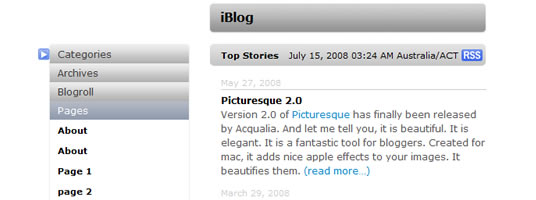
Infinite scroll has been called autopagerize, unpaginate, endless pages. But essentially it is pre-fetching content from a subsequent page and adding it directly to the user's current page. There is a little known feature in the .load() method that lets you specify the CSS selector of the html you want to include. jQuery will load in any local URL, then parse the html and grab only the elements you've defined with your selector.
2. jQuery Lightbox

This is the Wordpress's version of the jQuery Lightbox Plugin Used to overlay images on the current page, perfectly working with Wordpress 2.2 or up, and fully compatible with K2!
3. WordPress post information plugin
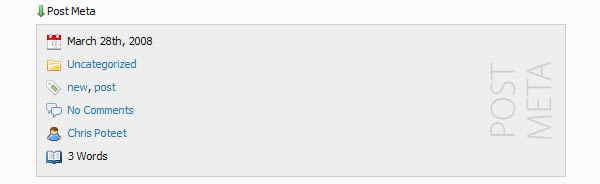
If real estate is a priority in your theme then this plugin can help by showing post meta information on demand by using a JavaScript toggle function.
4. Snazzy Archives
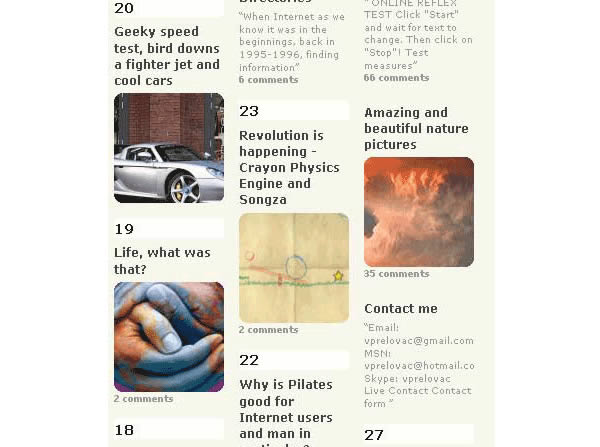
Snazzy Archives is a visualization plugin for your WordPress site featuring an unique way to display all your posts. You can select different layouts and special effects. Main features of Snazzy Archives are: Unique visual presentation of blog posts, Will work out of the box with all features, Posts are scanned for images and youtube videos and shown together with number of comments, Different editable layouts (HTML and CSS), Special effects using jQuery and more.
5. J Post Slider
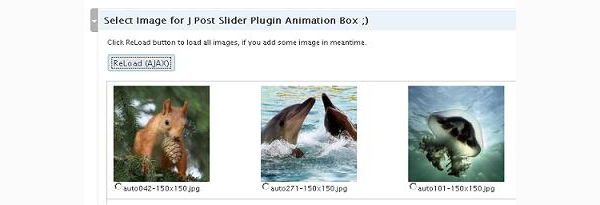
Show your post in fancy jQuery box, rotating images, with show-up text box with post description. Mousover stop the animation, and user can click on post link anytime.
6. WP-Imagefit
Rather than relying on a CSS or HTML-driven approach to resize large or wide images, WP-Imagefit relies on Javascript to proportionately resize images based on the width of the containing column.
7. WP Wall
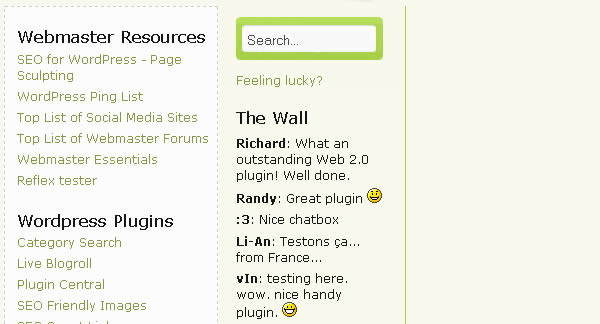
WP Wall is a "Wall" widget that appears in your blog's side bar. Readers can add a quick comment about the blog as a whole, and the comment will appear in the sidebar immediately, without reloading the page.
All comments are internally handled by WordPress so that means you have normal comment moderation, SPAM protection and new comment notification.
8. jQuery Comment Preview
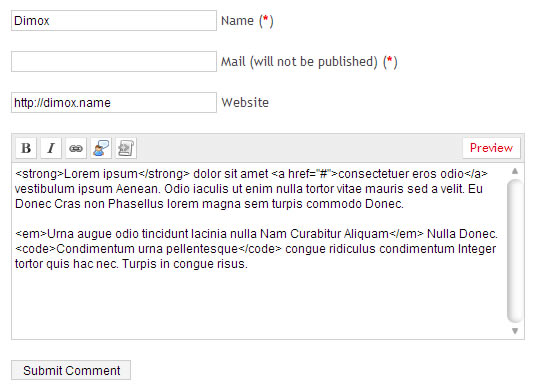
Live comment preview without page reboot using a simple HTML-editor.
9. Insights
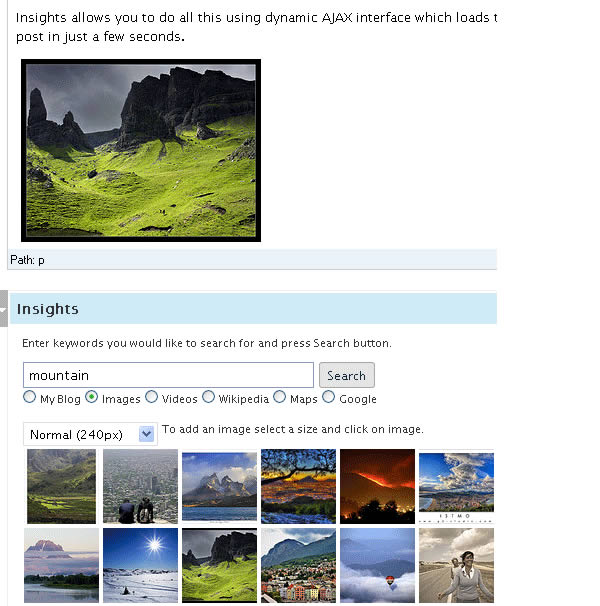
Insights brings a powerful new way to write your blog posts. It increases productivity and at the same time quality of your posts by using dynamic AJAX interface which loads the relevant information to your post in just a few seconds. Insights performs following functions in real-time: Interlink your posts, Insert Flickr images, Insert Youtube videos, Search Wikipedia, Search Google, Insert a Google Map and more.
10. µAudio Player
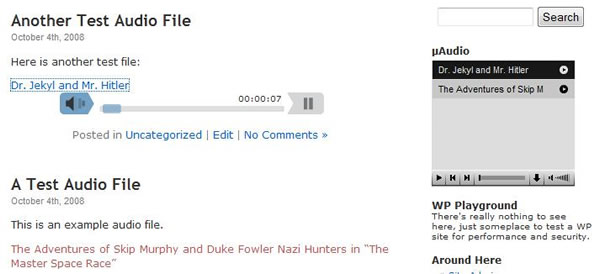
µAudio is a slim (450 Bytes!), fast plugin to create a flash mp3 player when mp3 links are clicked. In order to reduce clutter and file transfer, the links are unmodified until they are clicked, at which point a div with the player is faded in after the link. A second click on the link fades the player back out.
11. SimpleModal Contact Form
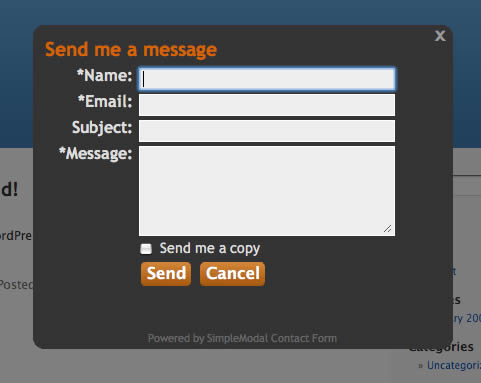
SimpleModal Contact Form (SMCF) is an Ajax powered modal contact form. It utilizes the jQuery JavaScript library and the SimpleModal jQuery plugin. SMCF has options to include certain contact form elements, like a Subject field and "Send me a copy" option for the sender.
12. Events Calendar
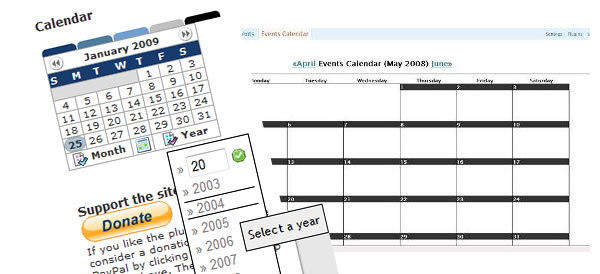
Events-Calendar is a diverse replacement for the original calendar included with WordPress adding many useful functions to keep track of your events.
13. µMint Plugin
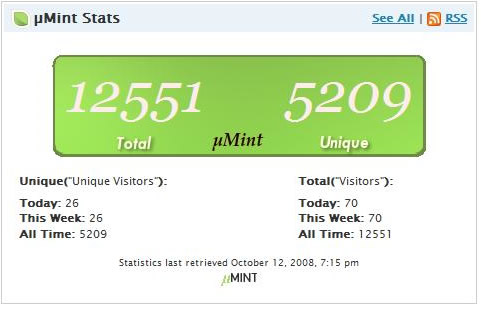
µMint is a slim plugin to integrate statistics from Shaun Inman's Mint statistics package into Wordpress.
14. Shockingly Big IE6 Warning
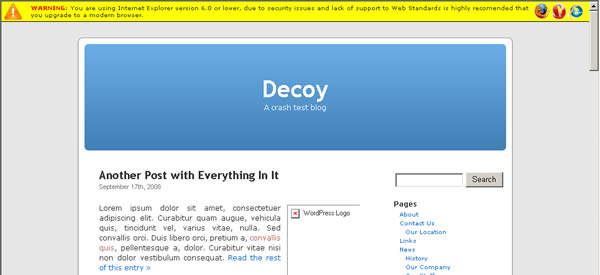
The Shockingly Big IE6 Warning is a plugin that shows a warning message alerting the user why is bad to use IE6, the security risk and the bad compatibility of Web Standards.
15. WP-Slimbox2 Plugin

A WordPress implementation of the stellar Slimbox2 script by Christophe Beyls (an enhanced clone of the Lightbox script) which utilizes the jQuery library to create an impressive image overlay with slide-out effects. Almost all options are configurable from the administration panel.
16. Live Blogroll
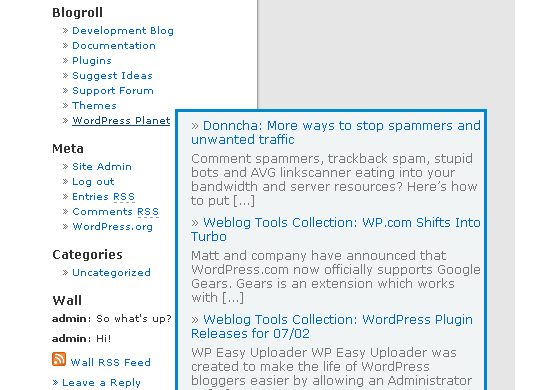
Live Blogroll will make your blogroll livelier. It will show a number of 'recent posts' for each link in your Blogroll using Ajax. When the user hovers the mouse above the link, RSS feed from the site is automatically discovered and a number of recent posts is shown dynamically in a box.
17. PhotoXhibit
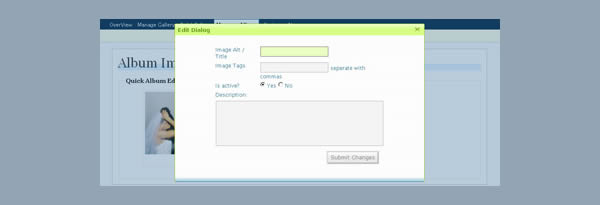
This plugin uses photos from your Flickr, Picasa, and/or SmugMug accounts as well as allows you to upload and build Albums to help you build inviting Photo Galleries on your site using the most popular JavaScript based gallery plugins. This plugin is not yet compatible with WordPress2.7
18. Wordpress Sidebar Turned Apple-Flashy Using jQuery UI
A tutorial to show you how to create Accordion plugin in jQuery UI to get the sidebar on the Apple Startpage and be able to show and hide it at your pleasure as well.
19. How To Create WordPress Tabs Using jQuery
Tabbed sidebar elements makes users simply click a tab to quickly access various parts of your site. This tutorial will teach you how to do this in your WordPress blog using jQuery.
- <div class="tabbed">
- <!-- The tabs -->
- <ul class="tabs">
- <li class="t1"><a class="t1 tab" title="<?php _e('Tab 1'); ?>"><?php _e('Tab 1'); ?></a></li>
- <li class="t2"><a class="t2 tab" title="<?php _e('Tab 2'); ?>"><?php _e('Tab 2'); ?></a></li>
- <li class="t3"><a class="t3 tab" title="<?php _e('Tab 3'); ?>"><?php _e('Tab 3'); ?></a></li>
- <li class="t4"><a class="t4 tab" title="<?php _e('Tab 4'); ?>"><?php _e('Tab 4'); ?></a></li>
- </ul>
- <!-- tab 1 -->
- <div class="t1">
- <!-- Put what you want in here. For the sake of this tutorial, we'll make a list. -->
- <ul>
- <li>List item</li>
- <li>List item</li>
- <li>List item</li>
- <li>List item</li>
- <li>List item</li>
- </ul>
- </div>
- <!-- tab 2 -->
- <div class="t2">
- <!-- Or, we could put a paragraph -->
- <p>This is a paragraph about the jQuery tabs tutorial.</p>
- </div>
- <!-- tab 3 -->
- <div class="t3">
- <!-- Or, we could add a div -->
- <div>Something needs to go in here!</div>
- </div>
- <!-- tab 4 -->
- <div class="t4">
- <!-- Why not put a few images in here? -->
- <p>
- <img src="image.gif" alt="Sample" />
- <img src="image.gif" alt="Sample" />
- <img src="image.gif" alt="Sample" />
- </p>
- </div>
- </div><!-- tabbed -->
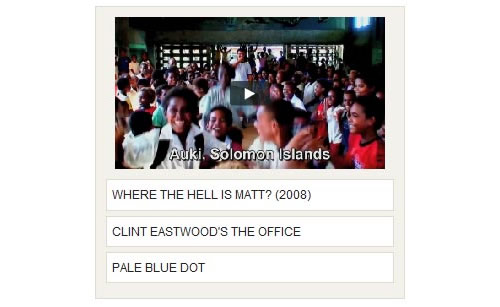
Another great tutorial by Nettuts teaching us how to Create A Tabbed Interface Using jQuery.
20. jQuery Reply to Comment
Add "reply" and "quote" features on each comment list. If you have jQuery installed on you blog, this Plugin add two link in each comments list (on single page). This plugin can auto include jQuery from Google Ajax API repository.
21. My Page Order
My Page Order allows you to set the order of pages through a drag and drop interface. The default method of setting the order page by page is extremely clumsy, especially with a large number of pages. jQuery is used a smooth for drag and drop effect.
22. Wordpress Featured Post Slideshow

Learn how to create an animated featured posts section in WordPress
23. GD Star Rating plugin
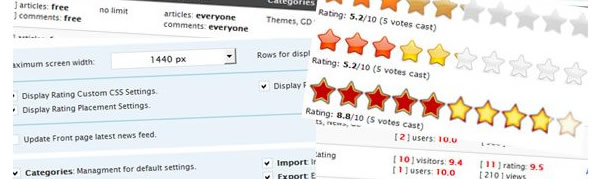
GD Star Rating plugin allows you to set up rating system for posts, pages and comments in your blog. You can set many options for displaying the rating stars, and also add widgets into the sidebars for displaying top ratings and other statistics generated by the plugin.
24. Create a featured posts slider in Wordpress using jFlow
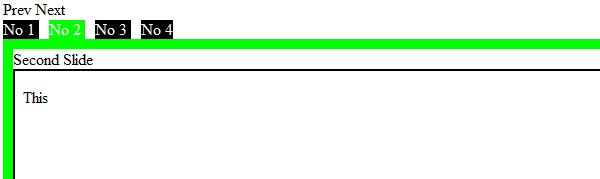
Many premium themes feature cool featured content sliding areas, where the latest posts appear. There is one such plugin, built around the Mootools library, but in this tutorial you will learn how to do this using jFlow jQuery plugin. It will also automatically scroll. Of course, this can easily be modified to use the navigation buttons as well.
Demo of the jFlow plugin can be seen here
25. Adding Form Validation to WordPress Comments using jQuery
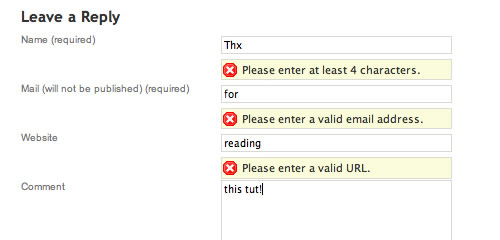
When it comes to simpler user experience, having your form validation happen instantly on the same page is a lot cleaner than reloading pages and possibly losing some form content. In this tutorial you will learn how to use jQuery to do some instant checking on an example comment form.
26. Using jQuery to liven up your WordPress login
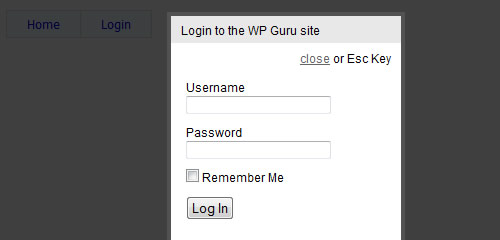
A quick method of simplifying the clients login process using jQuery lightbox.